Directcut: Free, Open-Source AI Video at the Model Price
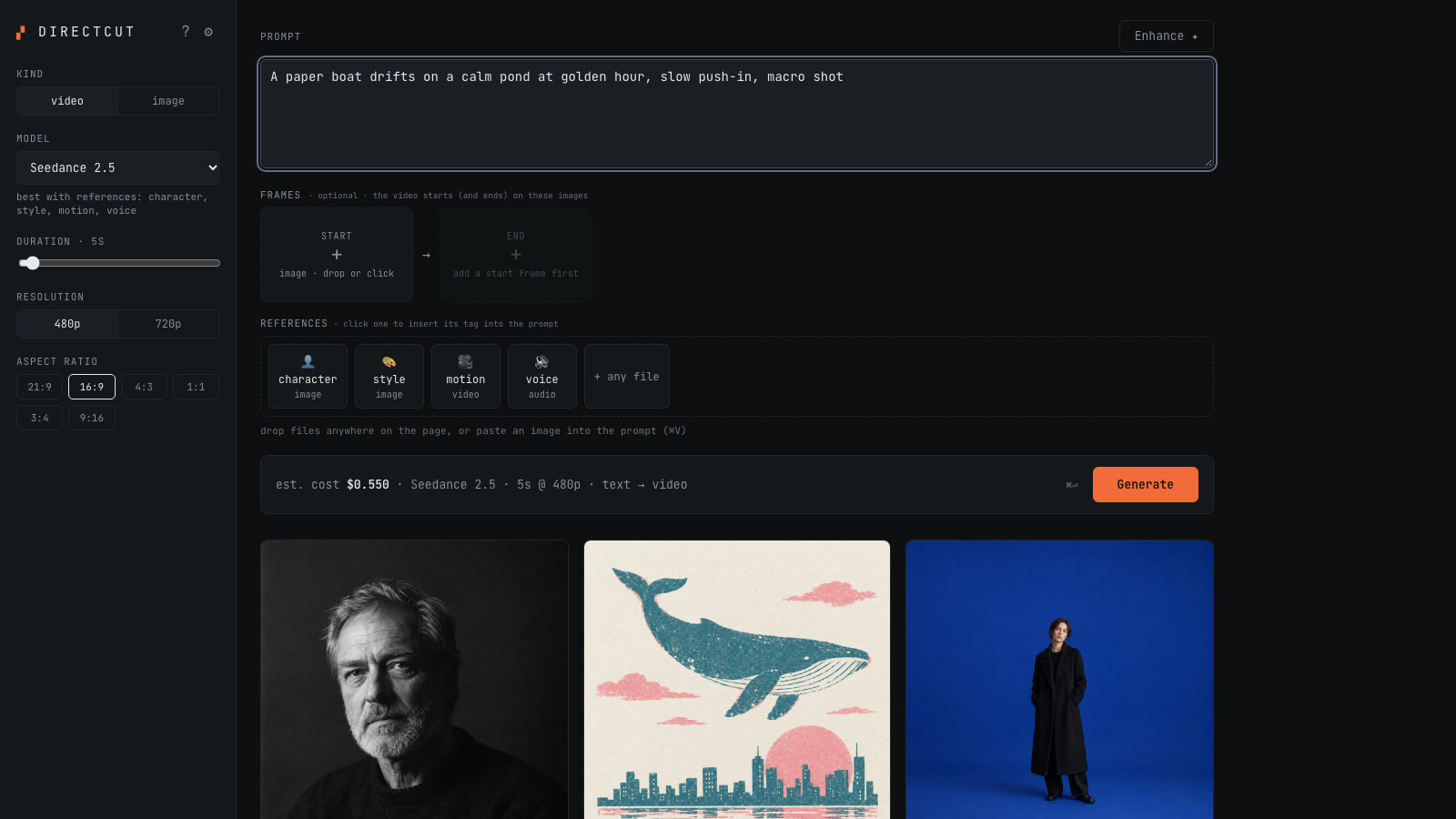
We released Directcut, a free app that runs AI video and image models on your own computer with your own OpenRouter key. No subscription, no credits.
AI video platforms sell the same handful of models behind monthly plans and credit packs. You pay for the model, then you pay again for the screen around it, and the files live on their servers.
We wanted the screen without the markup, so we built one and gave it away. It is called Directcut. It runs on your own computer, talks straight to OpenRouter with your own key, and you pay the model price for each generation. Nothing else.
What you can make with it
- Video with 8 models: Seedance 2.5 and 2 Fast, Kling 3.0 Pro and Standard, Veo 3.1 and Veo 3.1 Fast, Wan 3.0 and Hailuo 3.
- Images with 6 models: Seedream 5 Pro and Lite, Nano Banana Pro and Nano Banana 2, GPT Image 2 and Flux 3.
- Start and end frames, plus character, style, motion and voice references. Drop a file in and its @tag is written into your prompt.
- Enhance, which turns a rough idea into a detailed prompt through the same key. It never generates on its own.
- A gallery that keeps every file on your disk, with the model, settings and real cost of each one.
What it costs
The app shows an estimate before you click Generate, and swaps in the real charge when OpenRouter reports it. These are Directcut's own estimates, kept on the high side on purpose, from the price table in the README:
- A 5 second video at 480p on Seedance 2 Fast: about $0.23.
- A 5 second video at 720p with sound on Kling 3.0 Pro: about $0.84.
- A 6 second video at 1080p with sound on Veo 3.1 Fast: about $0.72.
- A 1K image on Seedream 5 Pro: about $0.045.
A daily spend cap, $10 by default, is checked on the server before every job, so a typo or a runaway script cannot drain your balance.
Set it up in about five minutes
- Install Node.js 22 or newer from nodejs.org.
- Create an OpenRouter account, add a few dollars of credit and make a key at openrouter.ai/keys.
- Download Directcut from GitHub, open a terminal in its folder and run npm run setup, then npm start.
- Open localhost:3456, choose a password and paste your key. A short guided tour shows you the rest.
There is a 90 second how-to video in the README, and the same video plays on the Directcut case study, next to screenshots of the app and the gallery.
What to know before you start
- Seedance and Seedream were tested end to end with real generations. The other models are wired from OpenRouter's published specs and covered by tests, but have not each had a real generation yet. If one misbehaves, open an issue.
- Seedance rejects photo-realistic faces as references and start frames. For realistic people in video, use Kling 3.0.
- It is a single-person tool on purpose: one password, no accounts, no teams, no billing.
- It is free software, provided as is. Your key, your spending and what you make are your responsibility.
Why a studio gives this away
We built Directcut for our own video work, and it was too useful to keep. Creators and small teams should be able to use these models at the price they cost, keep their files, and read the code that touches their key. If you want something like it built around your own business, that is what our AI development work is for.
Contributions are welcome, from a typo fix to a new model. Adding a model is one entry in one file, and the README explains how.